
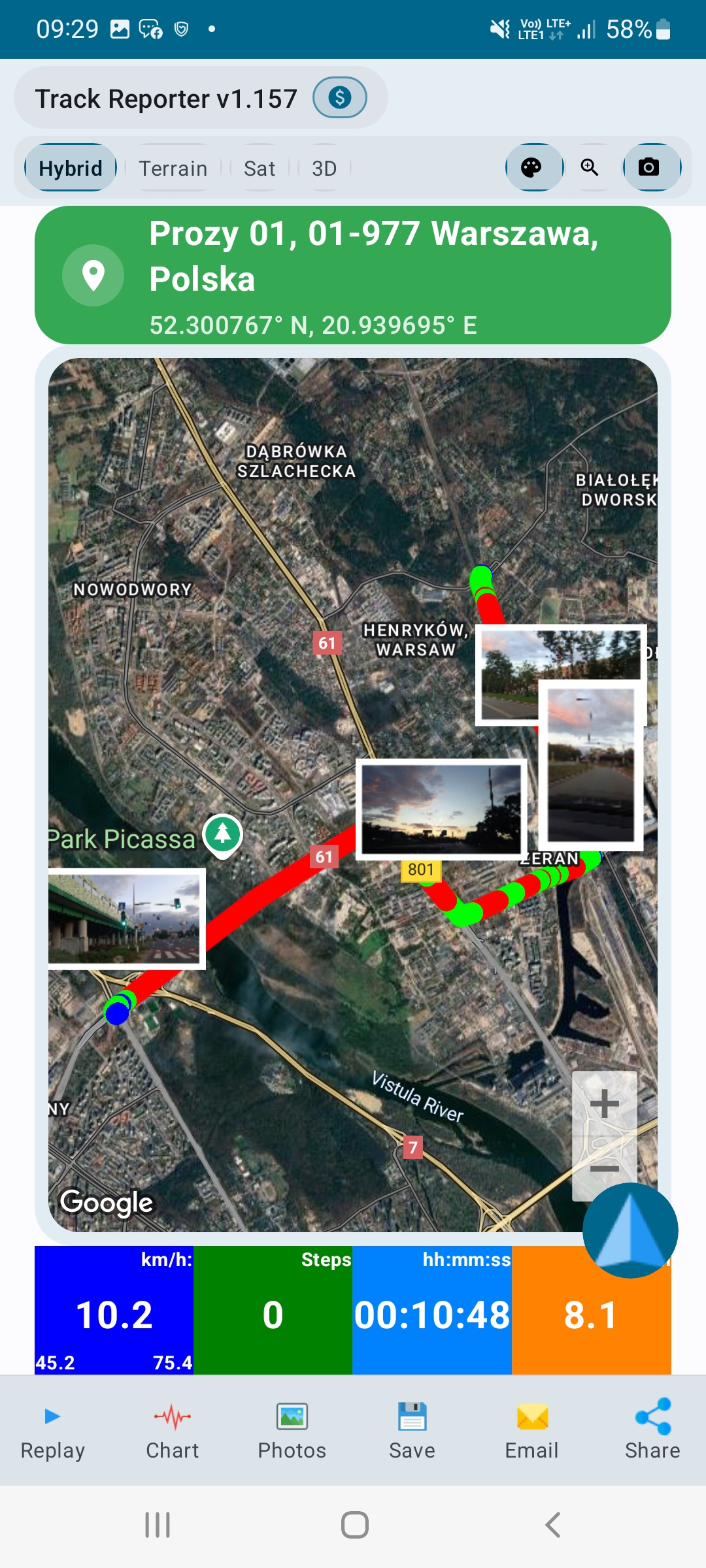
How can you demonstrate that a field worker visited a job site and documented the work performed? A GPS route, location-tagged photographs and a structured report can provide a useful record of the visit.
For inspectors, maintenance teams, field technicians and contractors, documenting work can be almost as important as doing it. Manual timesheets, paper checklists and photos spread across messaging apps make it difficult to reconstruct a site visit.
Track Reporter brings route recording, photo evidence and PDF reporting together in an Android app built around professional field activities.
What is proof of work in field services?
Proof of work is documentation that helps show where, when and how a field activity took place. It is useful when a supervisor or customer needs more context than a written confirmation that a job was completed.
A technician visits several facilities in one day. A record that combines GPS history, photos and timestamps helps link individual stops to the inspection activity and supports a clearer report for the customer.
Good field documentation can help answer practical questions: Which locations were visited? When did the worker arrive? What conditions were photographed? How can the visit be reviewed later?
Why GPS tracking alone is not enough
A GPS tracker can show a route, but a route alone does not establish which task was performed at a stop. Similarly, a photograph without location or time context may be difficult to connect to the correct visit.
For stronger documentation, combine three complementary elements:
Location
A recorded GPS route documents where the device traveled.
Time
Timestamps establish when recorded events occurred.
Photos
Images provide visual context for inspected conditions or completed tasks.
These records provide supporting evidence, not an absolute guarantee that a task was completed. GPS reception, device settings and documentation practices affect the reliability of any record.
How to document field work in five steps
Start recording the GPS route
Begin the recording session when starting field work. Track Reporter records GPS positions and timestamps and presents the route on a map so you can review the visit afterward.
Capture photo evidence on site
Photograph inspected areas, equipment or job results. Track Reporter can associate photos with geographic coordinates, times, categories and notes.
Continue documenting offline
Route recording does not require continuous mobile data. This is useful at remote installations or sites with poor connectivity. GPS accuracy still depends on reception and the device.
Review the route and activity history
Use the map and route playback to review the recorded journey and relate individual stops to photo evidence.
Generate a PDF field report
Bring route information and photo evidence into a professional report to share with a customer, supervisor or colleague.
Preview a sample inspection report
See how GPS documentation and photos can be presented together.
Who can use a GPS proof-of-work app?
Field service technicians
Keep a record of customer visits, travel between service locations and work-related photographs.
Site inspectors
Document inspection visits, observations and findings with a route and supporting images.
Maintenance teams
Capture equipment inspection rounds and visual records at individual locations.
Security patrol teams
Review patrol routes and capture time- and location-linked photographs.
Delivery operations
Document travel routes and photographic evidence associated with delivery activities.
Fleet managers
View shared live locations while team members are actively sharing, and browse shared recorded routes.
Track Reporter for Android: one workflow for field evidence
Track Reporter is designed for documenting professional field work rather than recreational fitness tracking. Its capabilities include GPS route recording, GPS-linked photo documentation, PDF reports, route playback and offline recording.
For teams, Fleet Live Monitoring provides shared location visibility during active sessions, and shared route history can be reviewed on a map. Live location sharing requires an internet connection.
The app also includes data-integrity and consistency features to support reliable review. These checks are helpful for documentation but do not substitute for independent certification or formal audit requirements.
Frequently asked questions
How can I document that a worker visited a job site?
Record the GPS route and collect relevant timestamped photos. A combined report gives the customer or supervisor a clearer, contextual record of the visit. It is supporting evidence, not conclusive proof of work quality.
Can I create an inspection report with GPS photos?
Yes. Track Reporter supports GPS-linked photographs and PDF reports for field work documentation.
Will the GPS recording work without internet access?
Track Reporter can record GPS routes offline. Live fleet location updates require internet access.
Can fleet managers see where field workers are?
Fleet Live Monitoring shows locations shared by participating users during active sharing sessions. Sharing is not the same as continuously tracking all employees.
Is Track Reporter available for iPhone?
Track Reporter is currently available for Android on Google Play.
Turn field visits into useful records
Reliable field documentation does not need to be assembled from separate maps, screenshots and photo galleries. Connecting routes, timestamps and photos creates a record that is easier to review, understand and share.
Record the route. Capture the evidence. Generate the report.
Document your next field assignment.
Record GPS routes, capture on-site photo evidence and prepare structured reports.